For supervisors
Confirming your supervisee’s hours takes a minute.
No account, no password, nothing to install. They send you a link; you check their weeks and confirm them, and your own copy of their log arrives by email, for your records.
- Always free for supervisors
- The whole batch in one tick, or send a week back for correction
- At the end, Form 4B comes filled in from the weeks you confirmed
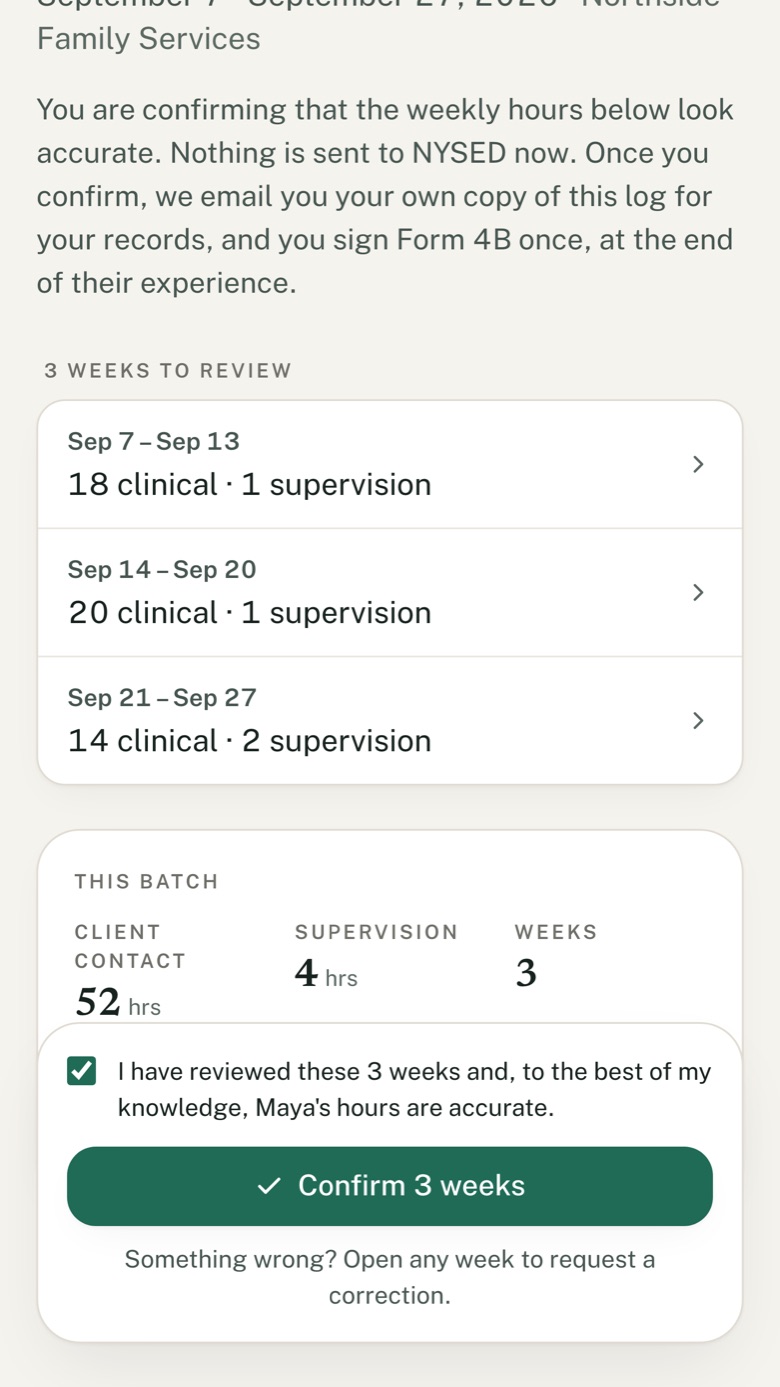
What you see, with an example account
How it works for you
A few minutes every month or two. Nothing to reconstruct at the end.
- 1
A link arrives by email
Your supervisee sends their weeks every month or two. One secure link opens in your browser.
- 2
Check the weeks, confirm
Client-contact and supervision hours, week by week. Confirm the batch in one tick, or open a week to ask for a correction.
- 3
Keep your copy
Each time, your own copy of their weekly log arrives by email, for the record NYSED asks you to keep.
When your supervisee is ready to apply, Form 4B comes filled in from the weeks you confirmed. You complete Section II, sign it and send it to NYSED yourself, as NYSED requires.
Questions supervisors ask
Do I need an account?
No. Each batch comes as a link by email; it opens in your browser, with nothing to install and no password.
Does it cost me anything?
No, and it never will. Your supervisee pays for their own record; reviewing it is always free for you.
What if a week looks wrong?
Open the week and ask for a correction. Your supervisee fixes it and sends it back; nothing is confirmed until you say so.
I supervise several people.
Each supervisee sends their own links. To see everyone who has sent you weeks in one place, sign in as a supervisor with the email they invited.
Does this replace Form 4B?
No. Form 4B is NYSED’s form, and you still sign and send it. Licensure Hours fills it in from the record you confirmed, so the signature at the end is a formality.
Working toward your LCSW?
Log your hours in seconds, and your supervisor confirms them as you go. Free for 30 days, no card.